OpenBadges 3.0 + Linked Data Proof + OID4VP (minimal, educational demo) By ChatGTP@Java
package com.tanakahda;

import java.nio.charset.StandardCharsets;
import java.security.KeyPair;
import java.security.KeyPairGenerator;
import java.security.PrivateKey;
import java.security.PublicKey;
import java.security.Signature;
import java.time.Instant;
import java.util.ArrayList;
import java.util.Base64;
import java.util.Collections;
import java.util.HashSet;
import java.util.List;
import java.util.Optional;
import java.util.Set;
import java.util.UUID;

//OpenBadges 3.0 + Linked Data Proof + OID4VP (minimal, educational demo)
//---------------------------------------------------------------
//目的: 典型アーキテクチャを Java だけで通しで理解するための最小サンプル。
//- Issuer: OB3のVCを発行(LDPで署名)
//- Wallet: VCを保持し、VerifierのOID4VPリクエストに応答してVPを作成
//- Verifier: presentation_definitionで要件提示 → 返送されたVP内VCのLDP検証 + トラスト判定
//
//重要な注意:
//1) これは“動作イメージ用”の最小コードです。実運用するには以下が必要です:
//  - 本物の LDP 実装(例: data-integrity-java)に差し替え
//  - JSON-LD 正規化/ @context 解決(例: Titanium JSON-LD)
//  - OID4VPの実フロー(OAuth2/OIDC: 認可リクエスト、DPoP、state/nonce、PKCE など)
//  - DID解決と verificationMethod 公開
//  - 失効/ステータス/トラストリスト運用
//2) 下記の LdpCrypto はデモ用の“ダミー実装”です。署名/検証は疑似化しています。
//  実機能を使う場合は TODO 部分に本物のライブラリ呼び出しを入れてください。
//
//依存を最小化するため、標準ライブラリ + Jackson (com.fasterxml.jackson.core:jackson-databind) を想定。
//Maven依存例:
//<dependency>
//<groupId>com.fasterxml.jackson.core</groupId>
//<artifactId>jackson-databind</artifactId>
//<version>2.17.1</version>
//</dependency>
//
//JSON-LD/LDPの本番実装に切り替える場合の参考(ライブラリ例):
//- Titanium JSON-LD: com.apicatalog:titanium-json-ld
//- Data Integrity / Linked Data Proof: (例)data-integrity-java
//
//---------------------------------------------------------------

import com.fasterxml.jackson.databind.JsonNode;
import com.fasterxml.jackson.databind.ObjectMapper;
import com.fasterxml.jackson.databind.node.ArrayNode;
import com.fasterxml.jackson.databind.node.ObjectNode;

public class Ob3LdpOid4vpDemo {

// === 共通: JSONユーティリティ ===
static final ObjectMapper M = new ObjectMapper();

 // === 疑似 LDP 署名/検証 ===
 static class LdpCrypto {
     private final KeyPair issuerKeyPair; // デモ用: 発行者の鍵

     LdpCrypto(KeyPair kp) { this.issuerKeyPair = kp; }

     // デモ: JSONをcanonicalizeした“つもり”のバイト列を作り、Ed25519風に署名する体裁
     // 実運用では JSON-LD Canonicalization + Data Integrity (eddsa-rdfc-2022) 等を使用
     public ObjectNode sign(ObjectNode unsignedVc, String verificationMethodDidUrl) throws Exception {
         // proof を除いた canonical bytes (ダミー)
         byte[] canonical = canonicalizeWithoutProof(unsignedVc);
         byte[] sig = signBytes(canonical, issuerKeyPair.getPrivate());

         ObjectNode proof = M.createObjectNode();
         proof.put("type", "DataIntegrityProof");
         proof.put("created", Instant.now().toString());
         proof.put("proofPurpose", "assertionMethod");
         proof.put("verificationMethod", verificationMethodDidUrl);
         proof.put("cryptosuite", "eddsa-rdfc-2022");
         proof.put("proofValue", Base64.getUrlEncoder().withoutPadding().encodeToString(sig));

         ObjectNode signed = unsignedVc.deepCopy();
         signed.set("proof", proof);
         return signed;
     }

     public boolean verify(ObjectNode signedVc) throws Exception {
         if (!signedVc.has("proof")) return false;
         ObjectNode proof = (ObjectNode) signedVc.get("proof");
         byte[] sig = Base64.getUrlDecoder().decode(proof.get("proofValue").asText());

         // proof を取り除いた canonical bytes (ダミー)
         ObjectNode copy = signedVc.deepCopy();
         copy.remove("proof");
         byte[] canonical = canonicalizeWithoutProof(copy);

         return verifyBytes(canonical, sig, issuerKeyPair.getPublic());
     }

     private static byte[] canonicalizeWithoutProof(ObjectNode obj) throws Exception {
         // デモ: 安定化のためフィールド名で再帰ソート → UTF-8 bytes
         // 本番は JSON-LD 正規化 (URDNA2015等) が必須
         String normalized = sortJson(obj).toString();
         return normalized.getBytes(StandardCharsets.UTF_8);
     }

     private static JsonNode sortJson(JsonNode node) {
         if (node.isObject()) {
             ObjectNode in = (ObjectNode) node;
             ObjectNode out = M.createObjectNode();
             List<String> names = new ArrayList<>();
             in.fieldNames().forEachRemaining(names::add);
             Collections.sort(names);
             for (String name : names) {
                 if ("proof".equals(name)) continue; // 除外(署名対象外)
                 out.set(name, sortJson(in.get(name)));
             }
             return out;
         } else if (node.isArray()) {
             ArrayNode in = (ArrayNode) node;
             ArrayNode out = M.createArrayNode();
             for (JsonNode item : in) out.add(sortJson(item));
             return out;
         } else {
             return node; // 値はそのまま
         }
     }

     private static byte[] signBytes(byte[] data, PrivateKey sk) throws Exception {
         Signature s = Signature.getInstance("SHA256withRSA"); // デモではRSAに
         s.initSign(sk);
         s.update(data);
         return s.sign();
     }

     private static boolean verifyBytes(byte[] data, byte[] sig, PublicKey pk) throws Exception {
         Signature s = Signature.getInstance("SHA256withRSA");
         s.initVerify(pk);
         s.update(data);
         return s.verify(sig);
     }
 }

 // === Issuer: OB3 VC を LDP で発行 ===
 static class IssuerService {
     private final String issuerDid; // 例: did:web:issuer.example.org
     private final String verificationMethod; // 例: did:web:issuer.example.org#keys-1
     private final LdpCrypto ldp;

     IssuerService(String issuerDid, String verificationMethod, LdpCrypto ldp) {
         this.issuerDid = issuerDid;
         this.verificationMethod = verificationMethod;
         this.ldp = ldp;
     }

     public ObjectNode issueOb3Credential(String subjectDid, String achievementId) throws Exception {
         ObjectNode vc = M.createObjectNode();
         ArrayNode ctx = M.createArrayNode();
         ctx.add("https://www.w3.org/ns/credentials/v2");
         ctx.add("https://purl.imsglobal.org/spec/vc/ob/vocab.jsonld");
         vc.set("@context", ctx);

         ArrayNode types = M.createArrayNode();
         types.add("VerifiableCredential");
         types.add("OpenBadgeCredential");
         vc.set("type", types);

         // issuer
         ObjectNode issuer = M.createObjectNode();
         issuer.put("id", issuerDid);
         vc.set("issuer", issuer);

         // credentialSubject
         ObjectNode cs = M.createObjectNode();
         cs.put("id", subjectDid);
         cs.put("achievement", achievementId);
         vc.set("credentialSubject", cs);

         vc.put("validFrom", Instant.now().toString());

         // LDP 署名付与
         return ldp.sign(vc, verificationMethod);
     }
 }

 // === Wallet: VC を保持し、OID4VP に応答して VP を作る ===
 static class WalletService {
     private final List<ObjectNode> vcs = new ArrayList<>();

     public void store(ObjectNode vc) { vcs.add(vc); }

     // presentation_definition を見て要件に合う VC を選び、VP を作成
     public ObjectNode handleOid4vpRequest(ObjectNode vpRequest) {
         // 1) presentation_definition の要件を単純化して判定(デモ)
         String requiredType = vpRequest.at("/presentation_definition/input_descriptors/0/constraints/fields/0/filter/const").asText("OpenBadgeCredential");

         Optional<ObjectNode> match = vcs.stream().filter(vc -> {
             for (JsonNode t : vc.withArray("type")) {
                 if (t.asText().equals(requiredType)) return true;
             }
             return false;
         }).findFirst();

         if (match.isEmpty()) throw new RuntimeException("No matching VC in wallet");

         ObjectNode vp = M.createObjectNode();
         ArrayNode ctx = M.createArrayNode();
         ctx.add("https://www.w3.org/ns/credentials/v2");
         vp.set("@context", ctx);

         ArrayNode types = M.createArrayNode();
         types.add("VerifiablePresentation");
         vp.set("type", types);

         ArrayNode arr = M.createArrayNode();
         arr.add(match.get());
         vp.set("verifiableCredential", arr);

         // DPoP/nonce の応答(デモ: 要求のnonceをそのまま返す)
         String nonce = vpRequest.path("nonce").asText(null);
         if (nonce != null) vp.put("nonce", nonce);

         return vp;
     }
 }

 // === Verifier: PEX で要件提示 → VP受領 → VC の LDP 検証 + トラスト判定 ===
 static class VerifierService {
     private final Set<String> trustedIssuers; // トラストポリシー(発行者DIDの許可リスト)
     private final LdpCrypto ldpForVerify;     // デモ: 発行者公開鍵を保持している想定

     VerifierService(Set<String> trustedIssuers, LdpCrypto ldpForVerify) {
         this.trustedIssuers = trustedIssuers;
         this.ldpForVerify = ldpForVerify;
     }

     // OID4VP: presentation_definition を作る(デモ用に最小)
     public ObjectNode buildVpRequest(String requiredType, String nonce) {
         ObjectNode req = M.createObjectNode();
         ObjectNode pd = M.createObjectNode();
         ArrayNode ids = M.createArrayNode();
         ObjectNode id0 = M.createObjectNode();
         ObjectNode constraints = M.createObjectNode();
         ArrayNode fields = M.createArrayNode();
         ObjectNode f0 = M.createObjectNode();
         ObjectNode filter = M.createObjectNode();

         // デモ: "type" に requiredType が含まれる VC を要求する
         f0.put("path", "$.type"); // 簡略化
         filter.put("const", requiredType);
         f0.set("filter", filter);
         fields.add(f0);
         constraints.set("fields", fields);
         id0.set("constraints", constraints);
         ids.add(id0);
         pd.set("input_descriptors", ids);
         req.set("presentation_definition", pd);
         req.put("nonce", nonce);
         req.put("client_id", "https://verifier.example.org");
         return req;
     }

     // 返送された VP を検証
     public boolean verifyVp(ObjectNode vp) throws Exception {
         // 1) nonce チェック(デモ)
         if (!vp.has("nonce")) return false; // 本来はリクエスト発行時の値と照合

         // 2) VC 抜き出し
         ArrayNode vcs = (ArrayNode) vp.get("verifiableCredential");
         if (vcs == null || vcs.isEmpty()) return false;
         ObjectNode vc = (ObjectNode) vcs.get(0);

         // 3) LDP 署名検証
         boolean sigOk = ldpForVerify.verify(vc);
         if (!sigOk) return false;

         // 4) 発行者トラスト判定
         String issuerId = vc.path("issuer").path("id").asText();
         return trustedIssuers.contains(issuerId);
     }
 }

 /**
  * Main method
  * @param args
  * @throws Exception
  */
 public static void main(String[] args) throws Exception {
     // === デモの流れ ===

     // 鍵ペア(デモ: RSA。実運用は Ed25519 + Data Integrity を推奨)
     KeyPairGenerator kpg = KeyPairGenerator.getInstance("RSA");
     kpg.initialize(2048);
     KeyPair issuerKeys = kpg.generateKeyPair();

     // LDP 疑似実装をセット
     LdpCrypto ldp = new LdpCrypto(issuerKeys);

     // Issuer
     IssuerService issuer = new IssuerService(
             "did:web:issuer.example.org",
             "did:web:issuer.example.org#keys-1",
             ldp
     );

     // Wallet
     WalletService wallet = new WalletService();

     // Verifier
     VerifierService verifier = new VerifierService(
             new HashSet<>(List.of("did:web:issuer.example.org")),
             ldp // デモでは発行者の公開鍵を内包
     );

     // 1) Issuer が OB3 VC を LDP 署名で発行
     ObjectNode vc = issuer.issueOb3Credential(
             "did:key:z6Mkwalletsubject",
             "https://issuer.example.org/achievements/java-basic"
     );
     System.out.println("[Issuer] VC (signed):\n" + M.writerWithDefaultPrettyPrinter().writeValueAsString(vc));

     // 2) Wallet が VC を保存
     wallet.store(vc);

     // 3) Verifier が OID4VP の VP リクエスト(PEX: OpenBadgeCredential を要求)
     ObjectNode vpReq = verifier.buildVpRequest("OpenBadgeCredential", UUID.randomUUID().toString());
     System.out.println("\n[Verifier] VP Request (presentation_definition):\n" + M.writerWithDefaultPrettyPrinter().writeValueAsString(vpReq));

     // 4) Wallet が要件にマッチする VC を選び、VP を作成して返送
     ObjectNode vp = wallet.handleOid4vpRequest(vpReq);
     System.out.println("\n[Wallet] VP Response:\n" + M.writerWithDefaultPrettyPrinter().writeValueAsString(vp));

     // 5) Verifier が VP 内の VC を検証(LDP 署名 + 発行者トラスト)
     boolean ok = verifier.verifyVp(vp);
     System.out.println("\n[Verifier] VP verification result: " + ok);
 }
}
<project xmlns="http://maven.apache.org/POM/4.0.0" xmlns:xsi="http://www.w3.org/2001/XMLSchema-instance" xsi:schemaLocation="http://maven.apache.org/POM/4.0.0 https://maven.apache.org/xsd/maven-4.0.0.xsd">
  <modelVersion>4.0.0</modelVersion>
  <groupId>OB3-java-example</groupId>
  <artifactId>OB3-java-example</artifactId>
  <version>0.0.1-SNAPSHOT</version>
  <build>
    <sourceDirectory>src</sourceDirectory>
    <plugins>
      <plugin>
        <artifactId>maven-compiler-plugin</artifactId>
        <version>3.8.1</version>
        <configuration>
          <release>23</release>
        </configuration>
      </plugin>
    </plugins>
  </build>
    <dependencies>
        <!-- Jackson Core -->
        <dependency>
            <groupId>com.fasterxml.jackson.core</groupId>
            <artifactId>jackson-core</artifactId>
            <version>2.17.1</version>
        </dependency>

        <!-- Jackson Databind(ObjectMapper など) -->
        <dependency>
            <groupId>com.fasterxml.jackson.core</groupId>
            <artifactId>jackson-databind</artifactId>
            <version>2.17.1</version>
        </dependency>

        <!-- Jackson Annotations(@JsonProperty など) -->
        <dependency>
            <groupId>com.fasterxml.jackson.core</groupId>
            <artifactId>jackson-annotations</artifactId>
            <version>2.17.1</version>
        </dependency>
    </dependencies>
</project>
Applications/Docker.app' is not there.
以前にDockerを使わなくなったので削除したけど、再び入り用になりbrewでインストールしたら下記のエラーがでた
brew install --cask docker
Error: docker: It seems the App source '/Applications/Docker.app' is not there.
このエラーを回避するためには下記を実行する
brew uninstall --cask docker
SLF4J + Logbackのメモ@Java
pom.xml
        <!-- https://mvnrepository.com/artifact/org.slf4j/slf4j-api -->
        <dependency>
            <groupId>org.slf4j</groupId>
            <artifactId>slf4j-api</artifactId>
            <version>2.0.13</version>
        </dependency>
        <!-- https://mvnrepository.com/artifact/ch.qos.logback/logback-classic -->
        <dependency>
            <groupId>ch.qos.logback</groupId>
            <artifactId>logback-classic</artifactId>
            <version>1.5.6</version>
        </dependency>
logback.xml は src/main/resourceに配置
<configuration>

    <property name="outputDir" value="/Users/tanakahda/Desktop/App/logs/" />
    <property name="fileName" value="app" />
    <property name="format1" value="%d{yyyy/MM/dd HH:mm:ss.SSS} [%-4p] [%c] %m%n" />

    <appender name="FILE" class="ch.qos.logback.core.rolling.RollingFileAppender">
        <rollingPolicy class="ch.qos.logback.core.rolling.TimeBasedRollingPolicy">
            <fileNamePattern>${outputDir}${fileName}.%d{yyyy-MM-dd}.log</fileNamePattern>
            <maxHistory>7</maxHistory>
        </rollingPolicy>

        <encoder>
            <pattern>${format1}</pattern>
        </encoder>
    </appender>

    <appender name="STDOUT" class="ch.qos.logback.core.ConsoleAppender">
        <encoder>
            <pattern>${format1}</pattern>
        </encoder>
    </appender>

    <root level="debug">
        <appender-ref ref="FILE" />
        <appender-ref ref="STDOUT" />
    </root>
</configuration>
import org.slf4j.Logger;
import org.slf4j.LoggerFactory;

public class Main {

    /** ログ出力クラス */
    private static Logger _log = LoggerFactory.getLogger(Main.class);

    public static void main(String[] args) {

        _log.info("処理を開始します。");

        _log.info("処理を終了しました。");
    }
結果:
2024/07/06 00:55:56.363 [INFO] [com.tanakahda.Main] 処理を開始します。
2024/07/06 00:55:57.753 [INFO] [com.tanakahda.Main] 処理を終了しました。
入出力でフォルダを再帰的に操作する@Java
Files#walkFileTreeは、ディレクトリ構造を再帰的に走査する。walkFileTreeメソッドの2つ目の引数にFileVisitorインターフェースの実装をセットする。
   /**
    * 指定したディレクトリ配下をすべて削除します。
    *
    * @param dir
    * @throws IOException
    */
    public static void deleteAll(Path dir) throws IOException {

        Files.walkFileTree(dir, new SimpleFileVisitor<Path>() {
            @Override
            public FileVisitResult visitFile(Path file, BasicFileAttributes attrs) throws IOException {
                Files.delete(file);
                return FileVisitResult.CONTINUE;
            }

            @Override
            public FileVisitResult postVisitDirectory(Path dir, IOException exc) throws IOException {
                if (exc != null) {
                    throw exc;
                }

                Files.delete(dir);
                return FileVisitResult.CONTINUE;
            }
        });
    }
   /**
    * srcディレクトリ配下をdestディレクトリへコピーします。
    *
    * @param src コピー元
    * @param dest コピー先
    * @throws IOException
    */
    public static void copyAll(Path src, Path dest) throws IOException {

        Files.walkFileTree(src, new SimpleFileVisitor<Path>() {
                @Override
                public FileVisitResult visitFile(Path file, BasicFileAttributes attrs) throws IOException {
                    Path targetFile = dest.resolve(src.relativize(file));
                    Path parentDir = targetFile.getParent();
                    Files.createDirectories(parentDir);
                    Files.copy(file, targetFile, StandardCopyOption.REPLACE_EXISTING);
                    return FileVisitResult.CONTINUE;
                }
             }
        );
    }
javax.tools.JavaCompilerでコンパイルするときにクラスパスを指定する@Java
javax.tools.JavaCompilerでコンパイルするときに外部jarにクラスパスを通して実行する方法を調査。
javax.tools.JavaCompilerのオプションで"-cp"または"-classpath"を指定する。例えば、以下のように書くことができる。
JavaCompiler compiler = ToolProvider.getSystemJavaCompiler();
String[] options = new String[]{"-cp", "lib/mylib.jar"};
compiler.run(null, null, null, options, "MyClass.java");
これで、lib/mylib.jarに含まれるクラスをMyClass.javaで利用できる。
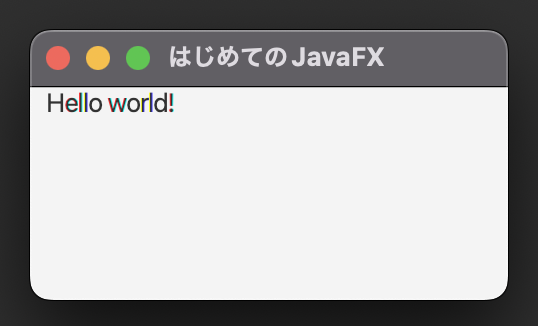
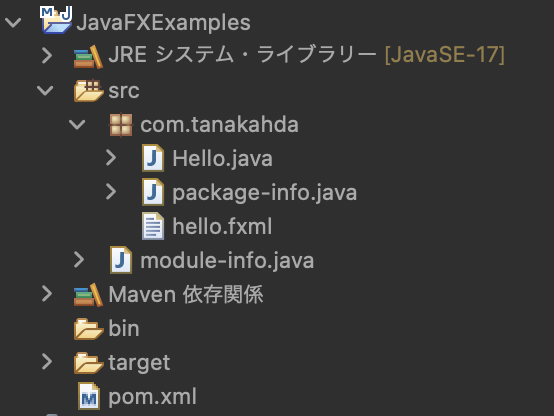
Hello JavaFX@JavaFX
Hello.java
package com.tanakahda;

import javafx.application.Application;
import javafx.fxml.FXMLLoader;
import javafx.scene.Scene;
import javafx.scene.layout.HBox;
import javafx.stage.Stage;

public class Hello extends Application {

    @Override
    public void start(Stage primaryStage) throws Exception {
        primaryStage.setTitle("はじめてのJavaFX");
        FXMLLoader loader = new FXMLLoader(getClass().getResource("hello.fxml"));
        HBox root = loader.load();
        Scene scene = new Scene(root);
        primaryStage.setScene(scene);
        primaryStage.show();
    }

    public static void main(String[] args) {
        launch(args);
    }
}
hello.fxml
<?xml version="1.0" encoding="UTF-8"?>
<?import javafx.scene.control.*?>
<?import javafx.scene.layout.*?>

<HBox>
    <children>
        <Label text="Hello world!" prefWidth="80.0" style="-fx-alignment:center"/>
    </children>
</HBox>
module-info.java
module JavaFXExamples {
    requires transitive javafx.controls;
    requires transitive javafx.fxml;
    opens com.tanakahda;
    exports com.tanakahda;
}
pom.xml
<project xmlns="http://maven.apache.org/POM/4.0.0" xmlns:xsi="http://www.w3.org/2001/XMLSchema-instance" xsi:schemaLocation="http://maven.apache.org/POM/4.0.0 https://maven.apache.org/xsd/maven-4.0.0.xsd">
    <modelVersion>4.0.0</modelVersion>
    <groupId>JavaFXExamples</groupId>
    <artifactId>JavaFXExamples</artifactId>
    <version>0.0.1-SNAPSHOT</version>
    <build>
        <sourceDirectory>src</sourceDirectory>
        <plugins>
            <plugin>
                <artifactId>maven-compiler-plugin</artifactId>
                <version>3.8.1</version>
                <configuration>
                    <release>17</release>
                </configuration>
            </plugin>
        </plugins>
    </build>
    <dependencies>
        <dependency>
                <groupId>org.openjfx</groupId>
                <artifactId>javafx-controls</artifactId>
                <version>17</version>
        </dependency>
        <dependency>
                <groupId>org.openjfx</groupId>
                <artifactId>javafx-fxml</artifactId>
                <version>17</version>
        </dependency>
    </dependencies>
</project>
